
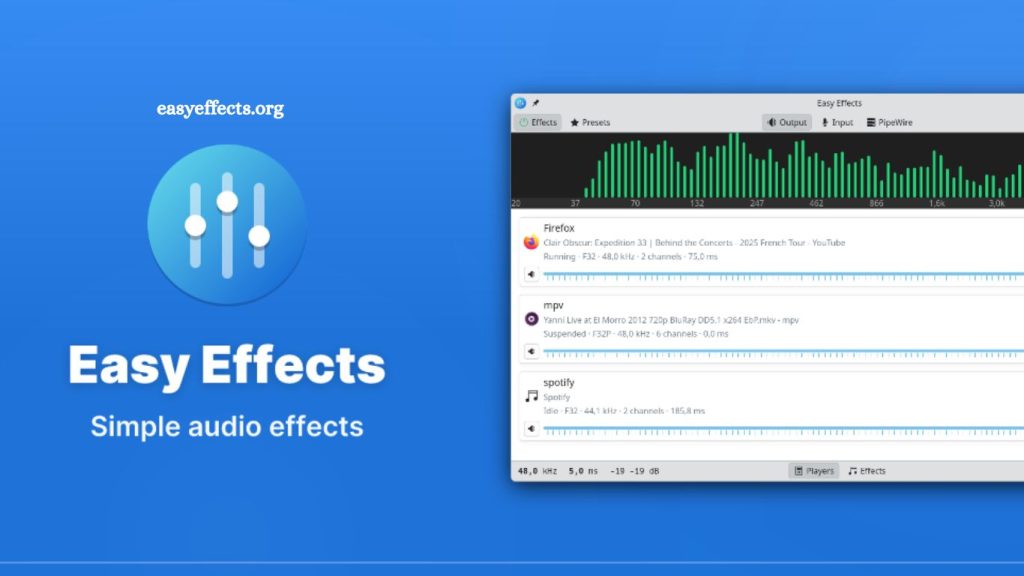
Linux users often search for reliable tools that improve audio quality without requiring expensive hardware. EasyEffects stands out as one of the most powerful sound enhancement applications available for Linux systems. Built for modern Linux desktops, this open-source software gives users complete control over audio effects, equalization, noise reduction, and sound customization.
Content creators, gamers, streamers, music lovers, and professionals use EasyEffects to transform ordinary audio into a premium listening experience. Advanced sound processing features combined with a simple interface make EasyEffects popular across the Linux community.
This guide explains everything about EasyEffects, including its features, installation process, benefits, and practical use cases.
EasyEffects Overview
EasyEffects is an audio effects application designed for Linux systems running PipeWire. Earlier versions were known as PulseEffects, but the project was renamed after major updates and compatibility improvements.
Software processes audio in real time and allows users to apply different sound effects to both input and output devices. Users can improve microphone clarity, increase bass, balance frequencies, reduce background noise, and create professional audio profiles.
Read More: What is EasyEffects?
Unlike traditional audio software, EasyEffects works system-wide. Every application on the computer can benefit from the selected sound settings.
Key Features of EasyEffects
EasyEffects offers a large collection of audio tools that help users customize sound according to personal preferences.
Real-Time Audio Processing
EasyEffects processes sound instantly, with no noticeable delays. Users can hear changes immediately as they adjust audio settings.
Real-time processing helps during:
- Music playback
- Video streaming
- Online meetings
- Gaming sessions
- Podcast recording
- Live streaming
- Advanced Equalizer
Built-in equalizer allows users to fine-tune audio frequencies for better sound quality.
Popular equalizer adjustments include:
- Bass enhancement
- Vocal clarity
- Treble optimization
- Balanced music profiles
- Gaming sound improvement
Users can create custom presets or import profiles shared by the Linux community.
Noise Reduction
Background noise often affects microphone quality during meetings and recordings. EasyEffects includes advanced noise suppression tools that reduce unwanted sounds like:
- Keyboard clicks
- Fan noise
- Static interference
- Environmental sounds
Content creators and remote workers benefit greatly from this feature.
Audio Limiter and Compressor
EasyEffects includes professional-grade compressors and limiters that automatically balance sound levels.
Benefits include:
- Reduced audio distortion
- Consistent volume levels
- Improved voice quality
- Better streaming audio
- Reverb and Echo Effects
Creative users can apply reverb and echo effects for music production and entertainment purposes.
Musicians and streamers frequently use these features to create immersive sound experiences.
Auto Gain Control
Auto gain adjusts volume levels dynamically to maintain consistent sound output. This feature improves listening comfort during movies, music playback, and voice communication.
Preset Management
EasyEffects supports custom presets, allowing users to save preferred audio settings for different activities.
Examples include:
- Gaming profile
- Music profile
- Podcast profile
- Movie profile
- Video conference profile
Switching between presets takes only seconds.
How EasyEffects Works
EasyEffects operates through PipeWire, a modern multimedia framework used in Linux distributions. PipeWire handles audio routing and processing efficiently, making EasyEffects more stable and responsive than older audio systems.
Software intercepts audio streams between applications and output devices. After processing audio with selected effects, EasyEffects sends enhanced sound to the speakers or headphones.
This workflow enables system-wide sound customization without modifying individual applications.
Why Linux Users Prefer EasyEffects
EasyEffects gained popularity because Linux users often need better sound control than default desktop settings provide.
Several reasons explain its growing adoption.
User-Friendly Interface
EasyEffects combines advanced audio tools with a clean graphical interface. Beginners can adjust sound settings without learning complex command-line instructions.
Open-Source Flexibility
Linux communities value open-source software for transparency and customization. EasyEffects follows this philosophy by providing free access to all features.
Developers regularly update the software based on community feedback.
Professional Audio Features
Many Linux audio tools focus only on basic sound controls. EasyEffects includes studio-quality effects commonly found in expensive audio software.
Professional-level functionality attracts streamers, audio engineers, and creators.
Better Audio Experience
Laptop speakers and budget headphones often produce flat sound. EasyEffects significantly improves audio depth, bass response, and vocal clarity.
Users notice immediate improvements in sound quality after applying optimized presets.
Best EasyEffects Features for Gamers
Gamers frequently use EasyEffects to improve competitive gameplay audio.
Enhanced Footstep Detection
Equalizer settings can boost important frequencies that highlight enemy footsteps in multiplayer games.
Clear Team Communication
Noise suppression and microphone enhancements improve voice chat clarity during online gaming sessions.
Immersive Audio Experience
Virtual surround sound and bass enhancement create more engaging gameplay.
EasyEffects for Content Creators
Streamers, podcasters, and YouTubers rely heavily on audio quality. Poor sound can quickly reduce audience engagement.
EasyEffects helps creators achieve professional audio without expensive equipment.
Microphone Enhancement
Built-in effects improve vocal quality dramatically by reducing noise and balancing sound frequencies.
Consistent Streaming Audio
Compressors and limiters maintain stable volume levels during live broadcasts.
Audio Presets for Different Projects
Creators can save custom profiles for:
- Streaming
- Recording
- Voiceovers
- Music production
Workflow efficiency improves significantly with preset management.
EasyEffects Presets Explained
Presets represent saved collections of audio settings.
Community-created presets help beginners improve sound instantly without manual adjustments.
Popular preset categories include:
- Bass Boost
- Crystal Clear Vocals
- Gaming Audio
- Studio Sound
- Podcast Voice Enhancement
Importing presets requires only a few clicks.
PipeWire Compatibility
EasyEffects works best with PipeWire because the framework offers lower latency and better audio routing.
Many modern Linux distributions now use PipeWire by default, including:
- Fedora
- Ubuntu
- Debian
- Arch Linux
- Pop!_OS
PipeWire compatibility ensures smooth performance and advanced sound processing.
Common EasyEffects Plugins
EasyEffects supports multiple plugins that extend audio functionality.
Equalizer Plugin
Adjusts frequency balance for customized sound output.
Compressor Plugin
Controls audio dynamics and reduces sudden volume spikes.
Limiter Plugin
Prevents clipping and distortion.
Noise Reduction Plugin
Filters background sounds from microphones.
Stereo Tools Plugin
Improves stereo imaging and sound depth.
Bass Enhancer Plugin
Boosts low-frequency audio for richer sound.
Each plugin serves a specific purpose in audio improvement.
Performance and Resource Usage
EasyEffects runs efficiently on most modern Linux systems. Resource consumption depends on the number of active effects and plugins.
Basic configurations use minimal CPU power, while advanced processing chains require additional resources.
Modern computers handle EasyEffects comfortably during:
- Gaming
- Streaming
- Video editing
- Music playback
Performance optimization remains one of the software’s strongest advantages.
EasyEffects vs PulseEffects
Many Linux users still recognize the older PulseEffects name.
Major differences include:
| Feature | PulseEffects | EasyEffects |
|---|---|---|
| Audio Backend | PulseAudio | PipeWire |
| Performance | Moderate | Improved |
| Compatibility | Older Linux systems | Modern Linux systems |
| Stability | Good | Better |
| Future Support | Limited | Active development |
EasyEffects represents the next-generation version optimized for current Linux audio frameworks.
Advantages of Using EasyEffects
EasyEffects delivers several important benefits for Linux users.
Improved Sound Quality
Enhanced bass, vocals, and clarity create a premium listening experience.
Professional Audio Control
Advanced plugins provide studio-level sound customization.
Free and Open Source
Users access all features without licensing costs.
Active Community Support
Linux communities regularly share presets, tutorials, and troubleshooting solutions.
Flexible Configuration
Custom profiles support different audio scenarios effortlessly.
Potential Drawbacks
Despite strong performance, EasyEffects has a few limitations.
Learning Curve for Beginners
Advanced audio settings may confuse first-time users.
PipeWire Requirement
Older Linux systems using PulseAudio may require additional setup.
Plugin Overload
Applying too many effects simultaneously can impact sound quality or system performance.
Balanced configurations usually provide the best results.
Frequently Asked Questions
What is EasyEffects used for?
EasyEffects is used to enhance and customize audio on Linux systems with real-time effects, equalizers, and noise reduction tools.
Is EasyEffects free to use?
Yes, EasyEffects is completely free and open-source software designed for Linux users.
Does EasyEffects work on all Linux distributions?
EasyEffects works on most modern Linux distributions, especially those using PipeWire such as Ubuntu, Fedora, and Arch Linux.
What is the difference between EasyEffects and PulseEffects?
EasyEffects is the updated version of PulseEffects and is built to work with PipeWire instead of PulseAudio for better performance.
Can EasyEffects improve microphone quality?
Yes, EasyEffects includes noise reduction, compressor, and gain control features that significantly improve microphone clarity.
Is EasyEffects good for gaming?
Yes, gamers use EasyEffects to enhance footsteps, balance sound effects, and improve in-game audio clarity.
Do I need technical skills to use EasyEffects?
No, EasyEffects has a user-friendly interface with presets, making it easy for beginners to use without advanced technical knowledge.
Conclusion
EasyEffects delivers a complete Linux audio enhancement solution with real-time processing, advanced equalization, and professional-grade sound control. Built on PipeWire, it ensures stable performance while giving users full flexibility over system-wide audio customization. From gaming and streaming to music playback and content creation, it improves clarity, balance, and overall listening experience.