
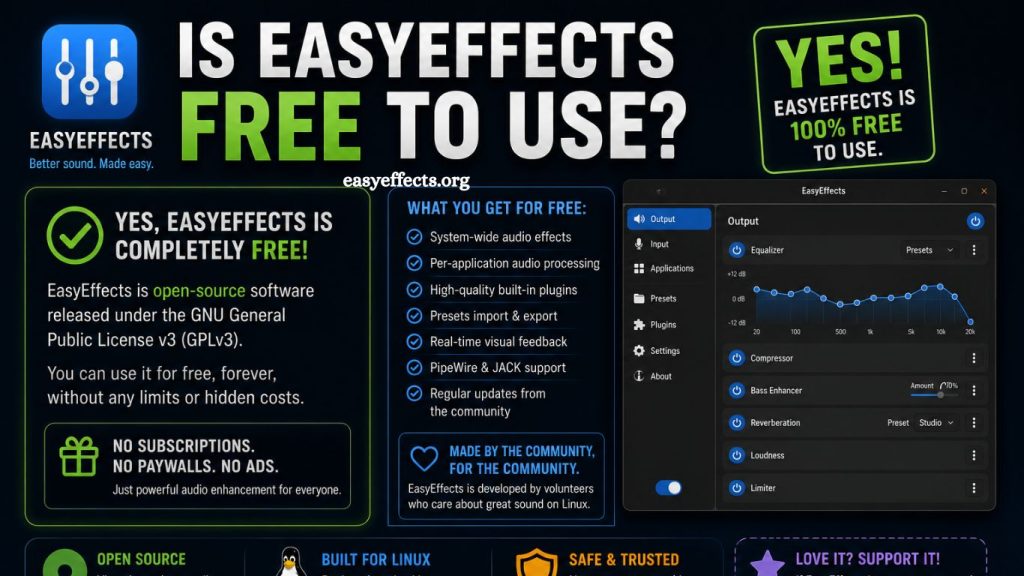
EasyEffects has gained strong attention among Linux users who want advanced audio control without expensive software. Many people search for clarity on one key question before installing it: whether EasyEffects is free to use and, if so, what limitations, if any, come with it. Understanding its pricing model, functionality, and value helps users decide if it fits their audio workflow.
What EasyEffects Is and Why It Matters
EasyEffects is an advanced audio processing application designed for Linux systems. It allows users to control sound input and output with professional-level effects, including equalization, compression, noise reduction, reverb, and more. The software integrates with PipeWire and PulseAudio systems, giving users deep control over system-wide audio.
Audio enthusiasts, streamers, musicians, and casual users rely on it to enhance sound quality beyond default system settings. Instead of basic volume control, EasyEffects delivers a modular audio chain, allowing each effect to be customized precisely.
Read More: EasyEffects Explained: Features, Benefits, and Uses
EasyEffects Free Usage Explained
Zero cost defines EasyEffects as a fully free and open-source application. Users can download, install, and use the software without paying licensing fees or subscription charges. No premium tier restricts features behind paywalls, and no hidden in-app purchases exist.
Open-source licensing allows full access to the source code, enabling developers to inspect, modify, and distribute the software under the terms of its license. This transparency ensures long-term trust and community-driven development.
Freedom extends beyond cost. Users gain unrestricted access to all features, including advanced plugins, system-wide audio routing, and real-time processing tools.
Open Source Advantage Behind EasyEffects
Community development drives EasyEffects forward. Contributors from around the world improve performance, fix bugs, and introduce new features. This collaborative model removes commercial pressure and focuses on usability and innovation.
Open-source licensing also prevents vendor lock-in. Users retain control over their software environment without dependency on paid upgrades or proprietary ecosystems. Flexibility becomes a core benefit, especially for Linux users who prefer customizable systems.
Security improves through transparency. Publicly available code allows independent audits, reducing the risk of hidden malicious components. Users benefit from both trust and adaptability in one package.
Core Features Available at No Cost
Full feature access comes standard with EasyEffects. No limitations restrict users from exploring its capabilities. Key features include:
Advanced Equalizer Control
Precision audio tuning enables users to adjust frequencies for speakers, headphones, or microphones. Multiple preset options simplify setup while allowing deep manual customization.
Real-Time Audio Processing
Instant feedback ensures changes apply immediately. Users can hear adjustments as they modify settings, improving workflow efficiency.
Noise Reduction Tools
Background noise removal helps in calls, recordings, and streaming environments. Adaptive filters improve clarity without requiring external hardware.
Audio Effects Chain
Modular effect chains allow users to stack multiple filters and processors. Each module operates independently, offering granular control over sound shaping.
Microphone Enhancement
Input processing improves voice clarity for communication apps, streaming platforms, and recording tools. Compression and gain control help maintain consistent audio levels.
Performance and System Integration
Lightweight design ensures EasyEffects runs efficiently on most Linux systems. PipeWire integration enhances stability and reduces latency, which is crucial for real-time audio applications.
Resource usage remains moderate even when multiple effects are active. Community optimization efforts focus on maintaining performance without sacrificing quality.
Compatibility extends across various Linux distributions, making it accessible to a wide range of users. Installation packages and repositories simplify setup on popular systems.
Who Benefits Most from EasyEffects
Different user groups gain value from EasyEffects without spending money on commercial alternatives.
Content creators improve audio quality for podcasts, YouTube videos, and live streams. Clear sound enhances audience engagement and professionalism.
Gamers benefit from improved spatial sound and voice clarity during online communication. Adjusted audio profiles enhance immersion and coordination.
Music listeners gain personalized sound profiles tailored to headphones or speakers. Equalizer settings allow fine-tuned listening experiences.
Professionals working remotely achieve clearer communication during video calls. Noise suppression and microphone enhancement reduce distractions.
Comparison With Paid Audio Software
Commercial audio tools often charge subscription fees or one-time licenses for advanced features. EasyEffects delivers similar functionality without financial barriers.
While premium tools may offer additional ecosystem integrations or proprietary plugins, EasyEffects effectively covers most essential and advanced use cases. For Linux users, it often becomes the preferred choice due to native compatibility and zero cost.
Trade-offs mainly appear in the support structure. Paid software usually includes dedicated customer service, while EasyEffects relies on community forums and documentation.
Installation and Setup Overview
Installation remains straightforward for most Linux distributions. Package managers or software centers typically provide EasyEffects directly. Flatpak support also simplifies cross-distribution installation.
The initial setup involves selecting the audio backend configuration, followed by choosing input or output devices. Users can then activate effects and adjust parameters through a graphical interface.
Prebuilt presets help beginners achieve good sound quality quickly, while advanced users can build custom profiles.
Common Misconceptions About EasyEffects
Some users assume free software lacks quality or reliability. EasyEffects challenges that assumption through consistent updates and strong community support.
Another misconception is that it has limited functionality compared to paid tools. In reality, the software offers extensive processing options that meet professional standards for many use cases.
Concerns about complexity also arise. While advanced features exist, the interface remains structured and user-friendly, allowing gradual learning.
Advantages of Using EasyEffects
Key benefits extend beyond cost savings. Flexibility stands out as a major advantage, giving users complete control over audio behavior.
Continuous improvements from developers ensure long-term relevance. Frequent updates introduce new features and maintain compatibility with evolving Linux systems.
Customizability allows users to build unique audio profiles tailored to specific environments or devices. This adaptability enhances both casual and professional use.
Limitations to Consider
No software remains perfect. EasyEffects may present a learning curve for beginners unfamiliar with audio processing concepts. Understanding effect chains requires time and experimentation.
Support depends heavily on community forums rather than official customer service. Users needing guaranteed assistance may find this challenging.
Linux-only availability restricts access for users on other operating systems, limiting cross-platform use.
Frequently Asked Questions
Is EasyEffects completely free?
Yes, EasyEffects is fully free to use with no subscription fees, hidden charges, or premium versions.
Is EasyEffects open-source software?
EasyEffects is open-source, allowing users to access, modify, and distribute the software under its license terms.
Do I need to pay to unlock features in EasyEffects?
No payment is required. All features are available without restrictions or paid upgrades.
Is EasyEffects safe to install?
Yes, it is widely used in the Linux community and considered safe when downloaded from trusted sources.
Does EasyEffects work on Windows or Mac?
No, EasyEffects is designed specifically for Linux systems and does not natively support Windows or macOS.
What are the main uses of EasyEffects?
It is used for audio enhancement, including equalizer control, noise reduction, microphone processing, and sound effects.
Does EasyEffects require internet access to work?
No, EasyEffects works offline after installation and does not need an internet connection for its core features.
Conclusion
EasyEffects delivers a powerful, professional-grade audio processing experience at no cost. As a fully open-source Linux application, it removes financial barriers while providing advanced tools for sound customization, noise reduction, and real-time audio control. Users gain complete access to all features without subscriptions or hidden charges, making it a strong alternative to paid audio software.