
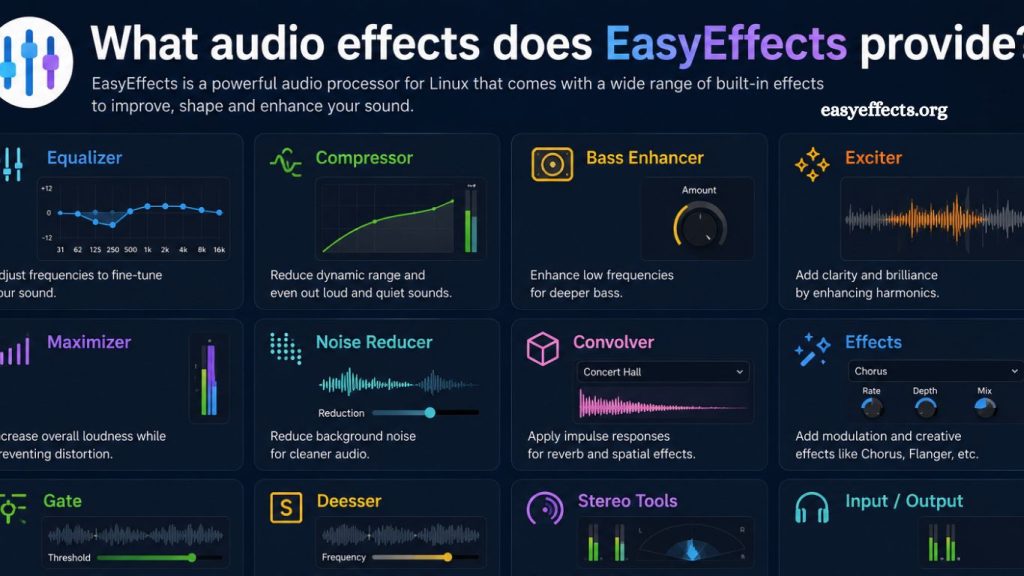
EasyEffects is a powerful open-source audio processing tool designed for Linux users who want full control over sound customization. It allows real-time audio effects on microphones, speakers, and system output, making it a preferred choice for audiophiles, streamers, podcasters, and professionals who need high-quality sound processing. Unlike basic system audio settings, EasyEffects offers a modular and highly customizable effects pipeline that can significantly enhance audio clarity, depth, and balance.
This article explores the full range of audio effects EasyEffects provides, how they work, and why they matter for everyday users and professionals.
Introduction to EasyEffects Audio Processing
EasyEffects functions as a digital audio processing suite that applies effects through a configurable chain. Each effect can be enabled, disabled, or fine-tuned based on user needs. It supports both input (microphone) and output (system audio) processing, allowing users to improve recording quality and playback experience.
The software integrates with modern Linux audio systems such as PipeWire, offering low-latency performance and real-time processing capabilities. Its interface is designed for both beginners and advanced users, making complex audio engineering tasks accessible without requiring deep technical knowledge.
Read More: Install EasyEffects on Linux: Step-by-Step Guide
Equalizer: Precise Sound Control
One of EasyEffects’ core features is the equalizer. It allows users to adjust specific frequency ranges to shape the audio output according to their preferences or the environment.
The equalizer helps:
- Boost bass for a deeper sound experience
- Enhance midrange for clearer vocals
- Adjust treble for sharper detail
Users can choose between graphic and parametric equalizers. The parametric option provides more precise control, enabling advanced tuning for professional-grade audio results. This feature is especially useful for music production, gaming, and podcast editing.
Compressor: Balanced Audio Levels
The compressor in EasyEffects reduces the dynamic range of audio signals. This means loud sounds are softened while quieter sounds become more audible, creating a balanced listening experience.
It is commonly used for:
- Voice recording consistency
- Live streaming audio control
- Reducing sudden volume spikes
By stabilizing sound levels, the compressor ensures smoother, more professional output, especially in environments where audio fluctuations are common.
Noise Reduction: Cleaner Sound Output
Noise reduction is one of the most important features for microphone input processing. EasyEffects uses advanced filtering to eliminate unwanted background noise such as fan hum, keyboard clicks, or ambient room sound.
This feature benefits:
- Remote workers in noisy environments
- Content creators recording at home
- Streamers needing a clean voice transmission
With proper tuning, noise reduction significantly improves clarity without making the voice sound artificial.
Noise Gate: Silence Unwanted Sounds
The noise gate works by cutting off audio signals below a certain threshold. When the input volume drops below this level, the gate closes, effectively removing low-level background noise.
It is useful for:
- Eliminating room noise during pauses
- Cleaning up speech recordings
- Improving podcast audio quality
When combined with noise reduction, the noise gate delivers a highly controlled and professional sound profile.
Limiter: Prevent Audio Clipping
The limiter ensures that audio signals do not exceed a defined maximum level. This prevents distortion or clipping, which can degrade sound quality.
It is essential for:
- Protecting speakers and headphones
- Maintaining consistent output levels
- Ensuring broadcast-quality audio
The limiter acts as a safety net in the audio chain, keeping output clean and distortion-free even during sudden loud peaks.
Reverb: Depth and Space Enhancement
Reverb adds spatial depth to audio by simulating how sound reflects in a physical environment. It can make audio feel like it is being played in a room, hall, or studio.
Common uses include:
- Music production enhancement
- Vocal depth improvement
- Creative sound design
When used carefully, reverb enriches sound quality. However, excessive use may reduce clarity, so fine adjustment is important.
Bass Enhancer: Stronger Low Frequencies
The bass enhancer boosts low-frequency sounds, creating a richer, more powerful audio experience. This effect is popular among users who enjoy music genres that rely heavily on bass.
Benefits include:
- More impactful music playback
- Enhanced cinematic audio experience
- Deeper sound profile for gaming
Proper calibration ensures bass enhancement does not overpower other frequencies.
Stereo Tools: Improved Sound Positioning
Stereo tools in EasyEffects allow users to adjust the spatial distribution of sound. This creates a wider or more focused stereo image depending on preference.
It helps with:
- Gaming immersion
- Music separation clarity
- Professional audio mixing
By controlling stereo width and balance, users can achieve a more dynamic listening experience.
Pitch Shifter: Voice and Sound Modification
The pitch shifter changes the frequency of audio signals without affecting playback speed. This effect is commonly used for creative audio manipulation.
Applications include:
- Voice transformation for content creation
- Music experimentation
- Audio effects in gaming and streaming
It offers creative flexibility for users who want to customize their sound.
Crossfeed: Natural Listening Experience
Crossfeed simulates how human ears naturally hear sound from speakers, reducing the extreme separation often found in headphones.
It improves:
- Long listening comfort
- Natural sound perception
- Reduced listening fatigue
This feature is particularly beneficial for headphone users who spend long hours listening to audio.
Convolver: Advanced Audio Simulation
The convolver effect allows users to apply impulse responses to audio to simulate real-world acoustic environments.
It is used for:
- Studio sound replication
- Theater and hall simulation
- High-end audio production
This feature is powerful for users seeking realistic and immersive audio environments.
Frequently Asked Questions
What is EasyEffects used for?
EasyEffects is used to apply real-time audio effects on Linux systems for microphones and system output, improving sound quality and control.
Does EasyEffects include an equalizer?
Yes, it includes both graphic and parametric equalizers, allowing precise adjustment of bass, mid, and treble frequencies.
Can EasyEffects reduce background noise?
Yes, it offers noise reduction and noise gate features that help remove unwanted background sounds during recording or streaming.
Is EasyEffects good for streaming and podcasts?
EasyEffects is widely used for streaming and podcasts because it improves voice clarity, balances volume, and reduces noise.
What does the compressor do in EasyEffects?
The compressor balances audio levels by reducing loud sounds and enhancing quieter ones, resulting in a consistent output.
Can EasyEffects prevent audio distortion?
Yes, the limiter feature prevents audio clipping and distortion by controlling maximum sound levels.
Is EasyEffects suitable for music production?
EasyEffects is suitable for basic to advanced music processing, offering effects like reverb, stereo tools, and pitch shifting.
Conclusion
EasyEffects delivers a complete audio processing solution for Linux users who need precise control over sound quality. Its wide range of effects, including equalizer, compressor, noise reduction, limiter, reverb, and stereo tools, makes it suitable for both everyday listening and professional audio work. The software enhances clarity, balance, and depth while allowing full customization of input and output audio.