
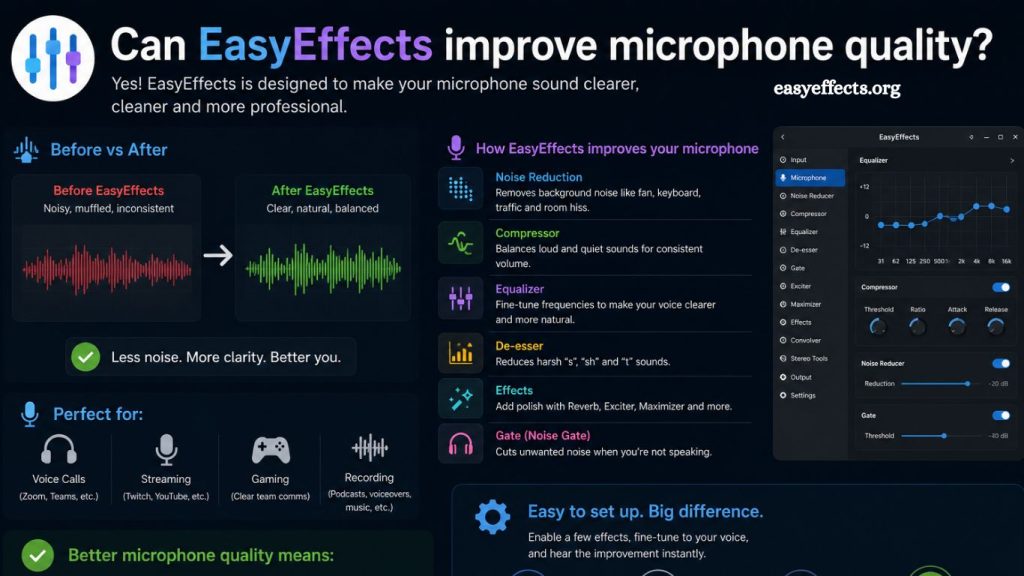
Microphone quality plays a critical role in communication, streaming, podcasting, and remote work. Poor audio can reduce clarity, affect professionalism, and weaken audience engagement. Many users turn to software solutions to enhance their microphone performance, and one of the most popular tools in the Linux audio ecosystem is EasyEffects. The key question remains: can EasyEffects truly improve microphone quality, or is it just an additional layer of processing?
This article explores how EasyEffects works, what improvements it can deliver, its limitations, and how to configure it for optimal microphone performance.
Understanding EasyEffects
EasyEffects is an advanced real-time audio processing application designed primarily for Linux systems using PipeWire audio. It allows users to apply a wide range of effects to both input and output audio streams. For microphones, EasyEffects acts as a digital audio processor that modifies the incoming signal before it reaches communication or recording applications.
Unlike basic system audio settings, EasyEffects provides professional-grade tools such as equalization, noise reduction, compression, and gate control. These tools are typically found in digital audio workstations (DAWs), but EasyEffects brings them into a real-time environment for everyday use.
Read More: EasyEffects Audio Effects Overview
How EasyEffects Enhances Microphone Quality
EasyEffects improves microphone quality by processing the raw audio signal in real time. This processing does not change the physical microphone hardware but enhances how the audio is shaped and delivered.
Noise Reduction
Background noise is one of the most common issues in microphone recordings. Fans, air conditioning, keyboard clicks, and environmental sounds can reduce clarity.
EasyEffects includes noise reduction modules that analyze audio patterns and suppress consistent background noise. This results in a cleaner and more focused voice signal, especially in non-treated environments.
Equalization (EQ)
Equalization allows users to adjust frequency levels in the audio signal. With EQ, you can reduce harsh tones, boost vocal clarity, and balance overall sound output.
For example, reducing low-frequency rumble and slightly boosting mid-range frequencies can significantly improve speech intelligibility. EasyEffects provides both graphical and parametric EQ options for precise tuning.
Compression
Microphone volume often fluctuates during speech. Compression reduces the dynamic range of audio, making soft sounds louder and loud sounds more controlled.
This leads to a more consistent voice level, which is essential for streaming, online meetings, and recordings. Proper compression settings can make audio sound more professional and stable.
Noise Gate
A noise gate automatically mutes audio signals below a certain threshold. This means background noise is reduced when you are not speaking.
For example, keyboard typing or room noise can be eliminated during silent moments, improving overall recording cleanliness.
De-Esser
Sibilant sounds like “s” and “sh” can be harsh in recordings. EasyEffects includes de-esser tools that reduce these sharp frequencies, making speech more pleasant and balanced.
Real Impact on Microphone Quality
EasyEffects does not physically upgrade your microphone, but it significantly improves perceived audio quality. The difference lies in post-capture processing.
A low-cost microphone can sound noticeably better when paired with proper EasyEffects configuration. However, it cannot fully transform a poor-quality microphone into a professional studio device. Hardware limitations such as capsule sensitivity, build quality, and signal-to-noise ratio still matter.
The best results occur when EasyEffects is used to refine an already decent microphone rather than compensate for extremely low-end hardware.
Best EasyEffects Settings for Clear Voice
While settings vary depending on voice type and environment, a general configuration can improve microphone output:
- Enable noise reduction with moderate intensity
- Apply high-pass filter around 80–100 Hz to remove low rumble
- Boost mid frequencies between 1–4 kHz for clarity
- Use light compression to stabilize volume levels
- Activate noise gate with a subtle threshold to avoid voice cut-off
- Apply de-esser if sibilance is noticeable
Fine-tuning is essential. Over-processing can introduce artifacts, robotic tones, or unnatural voice texture. Small adjustments often produce the best outcome.
Advantages of Using EasyEffects for Microphones
EasyEffects offers several benefits for users seeking better audio quality:
Improved Clarity
Voice becomes clearer and easier to understand due to frequency shaping and noise control.
Cost-Effective Enhancement
Instead of buying expensive microphones or audio interfaces, users can enhance existing setups with software processing.
Real-Time Processing
Changes are applied instantly, making it ideal for live streaming, gaming, and video conferencing.
High Customization
Users can create custom audio chains tailored to different environments, such as home offices, studios, or noisy rooms.
Limitations of EasyEffects
Despite its strengths, EasyEffects has limitations that should be considered:
Hardware Dependency
Audio quality still depends heavily on the microphone and sound card. Software cannot fully compensate for poor hardware.
Learning Curve
Proper configuration requires understanding audio concepts like frequency ranges, gain staging, and dynamic processing.
System Compatibility
EasyEffects is primarily designed for Linux systems using PipeWire. Users on other operating systems may need alternative tools.
Over-Processing Risk
Incorrect settings can degrade audio quality, introducing distortion or unnatural sound artifacts.
Who Should Use EasyEffects?
EasyEffects is suitable for a wide range of users:
- Streamers looking for improved live audio quality
- Remote workers attending frequent online meetings
- Podcasters recording voice content on Linux systems
- Gamers who want clearer communication with teammates
- Content creators seeking cost-effective audio enhancement
Anyone who relies heavily on voice communication can benefit from proper configuration.
EasyEffects vs Hardware Upgrades
A common question is whether software like EasyEffects can replace hardware upgrades. The answer is no, but it can delay the need for expensive equipment.
A high-quality microphone provides better signal capture, lower noise levels, and richer tonal detail. EasyEffects enhances and refines that signal but cannot create detail that was never recorded.
The ideal setup combines both:
- A decent-quality microphone
- Proper acoustic environment
- Smart software processing with EasyEffects
This combination produces professional-level audio without excessive cost.
Tips for Best Results
To maximize microphone quality using EasyEffects, consider the following practices:
- Record in a quiet environment whenever possible
- Position the microphone correctly to avoid plosives
- Avoid excessive gain on the microphone input
- Test different presets and adjust gradually
- Monitor audio output using headphones for accurate feedback
Consistency in setup leads to more stable and predictable results.
Frequently Asked Questions
Does EasyEffects actually improve microphone quality?
EasyEffects improves perceived microphone quality by applying real-time audio processing like noise reduction, EQ, and compression.
Can EasyEffects fix a low-quality microphone?
EasyEffects can enhance clarity and reduce noise, but it cannot fully compensate for poor hardware limitations.
Is EasyEffects good for streaming and gaming?
EasyEffects is effective for streaming and gaming because it provides real-time voice enhancement and consistent audio output.
Does EasyEffects reduce background noise?
Yes, it includes noise reduction and noise gate features that help minimize background sounds during recording or calls.
Is EasyEffects difficult to use?
EasyEffects has a learning curve, but presets and guides make it easier to configure for beginners over time.
Does EasyEffects work on Windows or Mac?
EasyEffects is mainly designed for Linux systems using PipeWire and is not natively available on Windows or macOS.
What is the best setup for microphone improvement in EasyEffects?
A balanced setup includes noise reduction, light compression, EQ adjustments, and a noise gate tuned to your environment.
Conclusion
EasyEffects delivers meaningful improvements in microphone quality through real-time processing tools such as noise reduction, equalization, compression, and gating. These features refine voice clarity, stabilize audio levels, and reduce unwanted background noise, creating a more professional sound output.