
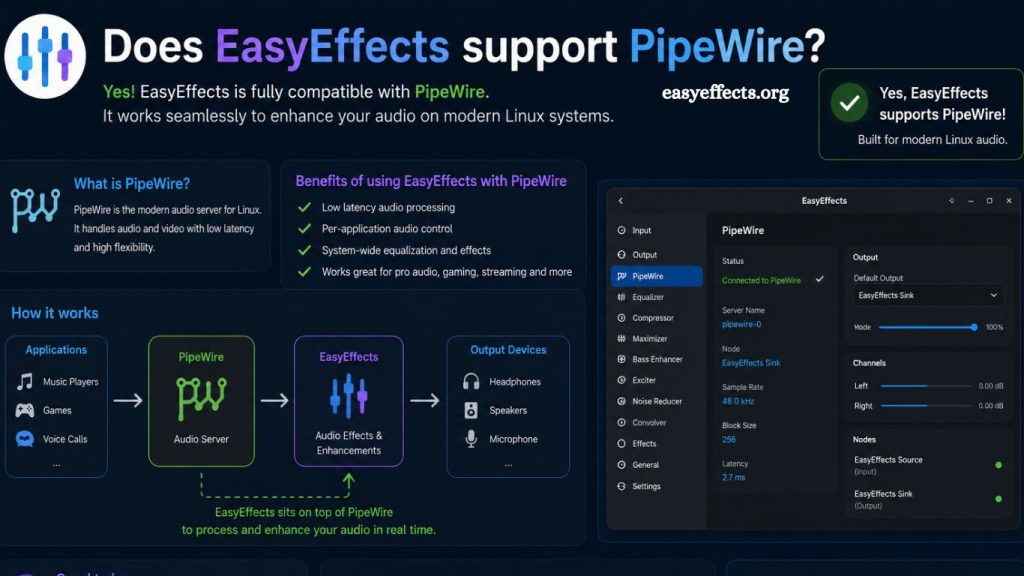
Modern Linux audio systems continue to evolve toward low-latency, flexible, and high-performance frameworks. PipeWire has emerged as a powerful replacement for older audio servers, offering unified handling of audio and video streams. EasyEffects has gained strong attention among Linux users seeking advanced audio processing, equalization, and effects control. Strong integration between EasyEffects and PipeWire has become a key advantage for users upgrading their audio workflow.
EasyEffects fully supports PipeWire and operates as one of the most reliable graphical audio processing tools built specifically around it. Seamless functionality, realtime processing, and low-latency performance define this integration. Linux users benefit from professional-grade audio control without complex configuration barriers.
What Is EasyEffects?
EasyEffects functions as an open-source audio processing application designed for Linux environments. Advanced users and everyday listeners use it to apply realtime effects such as equalization, noise reduction, compression, reverb, and limiters.
Originally, the application was called PulseEffects and worked with PulseAudio. Development shifted toward PipeWire compatibility as Linux audio architecture modernized. The transition improved performance, reduced latency, and expanded system integration capabilities.
Read More: EasyEffects microphone enhancement: does it improve audio quality?
Graphical interface design simplifies complex audio routing tasks. Users gain access to multiple audio effects chains without requiring terminal-based configuration. Studio-level sound manipulation becomes accessible on desktop systems.
Understanding PipeWire in Linux Audio Systems
PipeWire operates as a next-generation multimedia server for Linux. Audio and video streams pass through a unified framework that replaces older systems like PulseAudio and JACK in many distributions.
Low-latency performance stands as one of PipeWire’s strongest advantages. Professional audio production environments require precise timing, and PipeWire delivers that capability across consumer and professional setups.
Security improvements and sandboxing features enhance system stability. Applications interact with audio hardware in a controlled environment, reducing conflicts and crashes. Desktop environments such as GNOME and KDE Plasma are increasingly adopting PipeWire as the default.
EasyEffects and PipeWire Compatibility
EasyEffects integrates directly with PipeWire through native APIs. Real-time audio processing occurs through PipeWire nodes, enabling seamless signal flow between applications and hardware devices.
Support for PipeWire eliminates the need for PulseAudio compatibility layers in modern systems. Direct communication improves efficiency and reduces CPU overhead during heavy audio processing tasks.
System detection automatically identifies PipeWire as the active backend in most modern Linux distributions. Fedora, Ubuntu-based systems, Arch Linux, and many others ship PipeWire by default or as a primary option.
Audio streams pass through EasyEffects processing pipelines before reaching output devices. Each filter, equalizer band, or plugin applies changes in real time without noticeable delay.
How EasyEffects Works with PipeWire
Audio input enters PipeWire as a stream from applications or devices such as microphones and system audio sources. EasyEffects intercepts these streams through PipeWire nodes and applies configured effects.
Processing chains define how audio gets modified. Equalizers adjust frequency balance, compressors manage dynamic range, and noise-reduction modules clean unwanted background noise.
Output routing returns processed audio back into PipeWire for playback through speakers, headphones, or recording devices. Modular architecture allows users to create separate profiles for different use cases such as gaming, music production, or video calls.
Real-time visualization tools inside EasyEffects display frequency response and signal levels. Users gain immediate feedback on audio changes, enabling precise tuning.
Key Features Enabled by PipeWire Integration
Advanced feature support becomes possible due to PipeWire’s flexible architecture:
ReRealtimeudio processing ensures minimal delay between input and output signals. High-resolution audio handling allows accurate sound reproduction across professional and consumer hardware.
Multi-stream management enables independent processing for different applications. Separate audio profiles apply to individual sources such as browsers, media players, and communication apps.
Low CPU usage results from optimized PipeWire communication pathways. Efficient scheduling reduces system load during intensive audio tasks.
Plugin support extends functionality through LV2 and LADSPA audio plugins. Users customize sound behavior beyond standard equalizer settings.
Network transparency opens possibilities for remote audio streaming and advanced routing configurations in complex environments.
Installing EasyEffects with PipeWire Support
Package availability depends on the Linux distribution, though most modern systems include EasyEffects in official repositories or Flatpak format.
Flatpak installation provides consistent PipeWire support across distributions:
Flatpak command:
flatpak install flathub com.github.wwmm.easyeffects
Distribution package managers also support installation:
Debian-based systems:
sudo apt install easyeffects
Arch-based systems:
sudo pacman -S easyeffects
Fedora systems:
sudo dnf install easyeffects
PipeWire backend activation typically occurs automatically. Verification of an active audio server can be performed using system commands such as pactl info or pw-top.
Audio services require proper configuration to function properly. PipeWire, WirePlumber, and related session managers must remain active for optimal performance.
Configuring EasyEffects for PipeWire
The initial configuration begins by selecting input and output devices within the EasyEffects interface. PipeWire integration ensures all available system audio sources appear automatically.
Effect chains allow users to build custom processing pipelines. Each module can be enabled, disabled, or adjusted depending on use case requirements.
Preset management simplifies workflow efficiency. Users can switch between profiles such as “Music,” “Gaming,” or “Voice Call” instantly.
Microphone processing benefits significantly from PipeWire integration. Noise suppression, echo cancellation, and gain control improve communication quality in real time.
System-wide audio processing becomes possible by routing all output streams through EasyEffects using PipeWire sink configuration.
Benefits of Using EasyEffects with PipeWire
Enhanced audio quality stands as the primary benefit of this integration. High-resolution processing ensures clean output across multiple devices.
Lower latency improves responsiveness in gaming, live streaming, and music production environments. Real-time adjustments occur without noticeable delay.
Simplified configuration reduces technical barriers for Linux users. Graphical interface eliminates the need for manual command-line audio routing.
Greater system stability results from PipeWire’s modern architecture. Audio conflicts decrease significantly compared to older PulseAudio setups.
Professional audio control becomes accessible on standard desktop systems without specialized hardware or software.
Common Issues and Troubleshooting
Audio output not appearing often results from inactive PipeWire services. Restarting WirePlumber or PipeWire resolves most detection problems.
Missing devices may occur when incorrect permissions block audio access. Group membership checks for audio real-time privileges help restore functionality.
No sound after enabling effects typically indicates misconfigured output routing. Resetting EasyEffects pipeline settings resolves most cases.
High CPU usage rarely occurs, though excessive plugin chaining may increase processing load. Simplifying effect chains improves performance.
Flatpak sandbox limitations may restrict system access in rare cases. Additional permissions using Flatseal can resolve these constraints.
EasyEffects vs PulseAudio Era Tools
Legacy PulseAudio tools provided basic equalization and volume control. PipeWire compatibility elevates functionality far beyond those limitations.
Real-time processing in EasyEffects surpasses earlier PulseEffects implementations thanks to improved backend efficiency.
Unified media handling eliminates the need for separate audio and video systems. PipeWire consolidates workflows into a single architecture.
Modern Linux distributions increasingly phase out PulseAudio in favor of PipeWire, making EasyEffects a forward-compatible solution.
Practical Use Cases
Music production benefits from precise equalization and monitoring tools. Artists gain studio-like control over consumer hardware.
Gaming setups use spatial audio enhancements and dynamic range adjustments to create immersive experiences.
Streaming and content creation rely on noise-reduction and microphone-optimization features.
Office environments improve communication clarity through echo cancellation and voice enhancement profiles.
Frequently Asked Questions
Does EasyEffects work with PipeWire?
EasyEffects fully works with PipeWire and uses it as the primary audio backend on modern Linux systems.
Do I need PulseAudio to use EasyEffects?
PulseAudio is not required when PipeWire is active, as EasyEffects integrates directly with PipeWire.
How do I check if PipeWire is running?
Run commands such as pactl info or pw-top to confirm that PipeWire is active on your system.
Why is EasyEffects not detecting audio devices?
Inactive PipeWire services or missing permissions usually cause this issue and require restarting audio services.
Can EasyEffects improve microphone quality?
EasyEffects enhances microphone input using noise reduction, real-time cancellation, and real-time audio filters.
Is EasyEffects suitable for professional audio work?
EasyEffects provides advanced audio processing features suitable for streaming, gaming, and semi-professional production workflows.
Does PipeWire reduce audio latency in EasyEffects?
PipeWire significantly lowers real-time latency, improving real-time performance in EasyEffects processing chains.
Conclusion
EasyEffects delivers full compatibility with PipeWire, creating a modern and efficient Linux audio experience. Narealtimegration enables real-time processing, low-latency performance, and stable system-wide audio control. Users gain advanced sound customization through equalizers, filters, and professional-grade effects without complex configuration.