
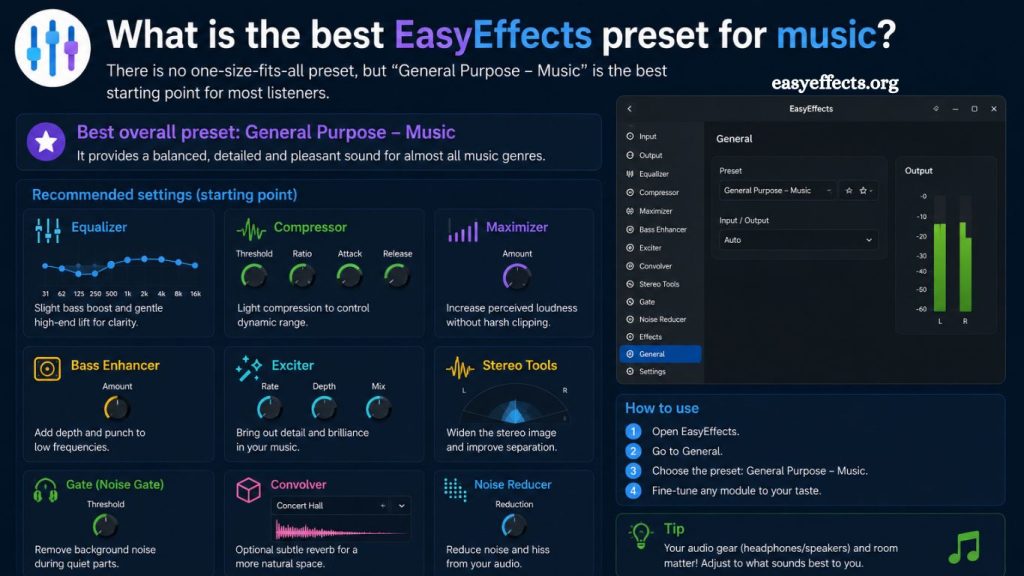
EasyEffects delivers advanced audio processing for Linux users seeking precise control over sound output. Music enthusiasts rely on it to enhance clarity, balance frequencies, and create immersive listening experiences. The search for the best EasyEffects preset for music depends on hardware, genre preference, and personal listening taste. A well-optimized preset transforms ordinary playback into studio-like sound quality without requiring professional engineering skills.
Audio customization through EasyEffects enables users to shape bass response, vocal clarity, stereo width, and dynamic range. Understanding preset behavior helps achieve consistent results across headphones, speakers, and external DAC systems. This guide explores the most effective EasyEffects presets for music and explains how to fine-tune them for superior performance.
Understanding EasyEffects Presets
EasyEffects presets function as pre-configured audio processing chains. Each preset includes a combination of equalizers, compressors, limiters, reverbs, and spatial enhancers. These tools adjust sound output in real time, modifying how the listener perceives music.
Equalization controls frequency balance across bass, midrange, and treble ranges. Compression stabilizes volume differences within tracks. Limiting prevents distortion at high output levels. Spatial processing enhances stereo depth and width for a more immersive soundstage.
Read More: EasyEffects PipeWire Support Explained
Preset selection influences overall listening quality more than individual adjustments. Balanced configurations often outperform aggressive tuning because they preserve audio integrity while enhancing clarity.
Best EasyEffects Preset Categories for Music
Flat Reference Preset
Flat reference presets prioritize accuracy over enhancement. Audio output remains neutral with minimal coloration. Music producers and critical listeners prefer this configuration for monitoring original sound quality.
Flat settings reduce exaggerated bass or treble, allowing natural instrument separation. Classical, jazz, and acoustic tracks benefit significantly from this approach. Listener fatigue decreases during long sessions due to balanced frequency distribution.
Bass Enhancement Preset
Bass enhancement presets amplify low-frequency response for impactful listening. Electronic, hip-hop, and EDM genres gain energy and depth from this configuration.
Sub-bass frequencies receive controlled amplification without overwhelming mids. Compression maintains clarity during heavy bass transitions. Proper tuning avoids distortion while preserving punch and rhythm consistency.
Balanced bass presets avoid excessive boominess by applying gradual gain curves rather than sharp boosts. Headphone users often prefer moderate bass enhancement for a richer experience.
Vocal Clarity Preset
Vocal clarity presets emphasize midrange frequencies where the human voice resides. Podcasts, acoustic performances, and vocal-heavy music benefit from this setup.
Equalization boosts presence frequencies around 2 kHz to 5 kHz. Background instruments remain controlled through mild compression. Lyrics become more intelligible without sacrificing musical depth.
This preset improves separation between vocals and instruments. Listening comfort increases during extended sessions involving storytelling or vocal performances.
V-Shaped Sound Preset
V-shaped presets enhance bass and treble while reducing midrange presence. This configuration creates a dynamic and energetic sound signature.
Modern pop, rock, and electronic tracks often sound more exciting when tuned V-shaped. Kick drums gain impact while cymbals achieve crisp brightness.
Midrange reduction may slightly affect vocal naturalness, yet overall excitement increases significantly. Casual listeners frequently prefer this tuning style due to its engaging character.
Audiophile Balanced Preset
Audiophile balanced presets aim for precision, depth, and transparency. Equalization remains subtle, while spatial effects enhance realism.
Stereo imaging expands naturally without artificial widening. Compression stays minimal to preserve dynamic range. High-resolution audio files benefit most from this configuration.
Music separation improves across complex arrangements. Instrument positioning becomes clearer, supporting analytical listening experiences.
How to Choose the Best EasyEffects Preset for Music
Headphone type plays a major role in preset selection. Closed-back headphones often require bass reduction, while open-back designs benefit from mild bass reinforcement. Speaker systems require room-correction adjustments for accurate sound staging.
Genre preference also influences preset choice. Electronic music favors bass-driven profiles, while classical music benefits from flat or balanced tuning. Rock and pop genres perform well with V-shaped enhancements.
The listening environment significantly impacts sound perception. Quiet rooms allow subtle details to emerge, while noisy environments require compression and clarity boosts.
Personal taste remains the final decision factor. Audio perception varies widely among individuals due to differences in hearing sensitivity and listening habits.
Customizing EasyEffects Presets for Better Results
Equalizer adjustments provide the foundation of customization. Small frequency changes produce noticeable improvements without introducing distortion. Gradual tuning ensures natural sound retention.
Compression settings control dynamic consistency. Low ratios maintain musical expression, while higher ratios create uniform loudness. Attack and release parameters influence responsiveness during transitions.
Limiter configuration prevents clipping at high volumes. Proper threshold selection ensures safe listening without compromising audio quality.
Spatial effects such as stereo widening require moderation. Excessive widening reduces mono compatibility and may distort instrument placement. Subtle enhancement delivers more realistic soundscapes.
Reverb settings add depth but must remain minimal for music playback. Overuse creates an artificial echo and reduces clarity.
Common Mistakes in EasyEffects Preset Setup
Over-boosting bass frequencies leads to muddy sound and listener fatigue. Excessive treble amplification causes harshness and ear discomfort. Improper compression destroys dynamic range and reduces musical emotion.
Stacking too many effects results in signal distortion. Clean signal chains perform better than complex processing chains. Frequent preset switching prevents a consistent listening experience.
Ignoring hardware limitations produces unrealistic expectations. Entry-level headphones cannot replicate high-end spatial accuracy regardless of software tuning.
Recommended Starting Preset Strategy
Balanced audiophile preset serves as the safest starting point. Small adjustments allow gradual refinement without overwhelming changes. Users can then shift toward bass enhancement or vocal clarity depending on preference.
Testing multiple genres helps identify weaknesses in current tuning. Iterative adjustments improve long-term listening satisfaction. Saving multiple preset profiles ensures flexibility across different music styles.
Advanced Tips for Optimal Sound Quality
High-quality audio files significantly improve EasyEffects performance. Lossless formats preserve frequency detail and dynamic range. Streaming platforms with high bitrate options deliver better results.
System-wide equalization should remain consistent across applications. Inconsistent tuning creates uneven listening experiences. Calibration using reference tracks ensures accuracy.
Regular updates to EasyEffects provide improved processing algorithms. Keeping software current enhances stability and sound quality.
Frequently Asked Questions
What is the best EasyEffects preset for music?
Best preset depends on preference, but balanced audiophile settings deliver the most natural and accurate sound experience.
Can EasyEffects improve music quality significantly?
EasyEffects enhances clarity, bass control, and stereo imaging, improving perceived audio quality on most headphones and speakers.
Which EasyEffects preset works best for bass lovers?
Bass enhancement presets work best for bass-heavy genres like EDM, hip-hop, and electronic music.
Does EasyEffects affect system performance?
EasyEffects uses minimal system resources on modern devices and runs smoothly during music playback.
Is a flat preset good for listening to music?
Flat presets provide neutral sound output, ideal for accurate listening and professional audio evaluation.
How do I create a custom EasyEffects preset?
Custom presets are created by adjusting the equalizer, compressor, limiter, and spatial settings according to personal preference.
Can EasyEffects be used for all music genres?
EasyEffects supports all genres, with different presets optimized for vocals, bass, or balanced sound profiles.
Conclusion
The best EasyEffects preset for music depends on listening goals, audio equipment, and personal taste. Balanced audiophile presets deliver accurate sound reproduction, while bass or V-shaped presets enhance energy and excitement for modern genres. Vocal-focused settings improve clarity in speech and lyrical tracks, making them ideal for podcasts and acoustic music.